HotStock - in-stock alerts
- 3.4
- Rating
- 500.00K
- Installs
- Free
- Price

 Analysis by App-foxy
I use shopping apps for two very different jobs: finding ordinary items quickly and waiting for something that disappears the moment it becomes available. HotStock belongs firmly to the second group. It is a shopping app from Litebox that watches for hard-to-find products and alerts me when they appear ready to buy. That sounds simple, but the value becomes clearer when I stop treating it like a general marketplace and use it as a focused watchlist for products I genuinely intend to purchase.
The app is free to install, rated for Everyone, and works on Android devices running Android 7.0 or later. Its current version is 1.0.178, and it has passed half a million installs. Those details make it feel accessible rather than specialized, although the average rating of 3.5 from roughly 7,800 ratings suggests that the experience is not equally smooth for everyone. In my view, HotStock is most useful when I already know what I want and need help with timing, not when I am casually browsing for inspiration.
How I use HotStock when a product keeps selling out
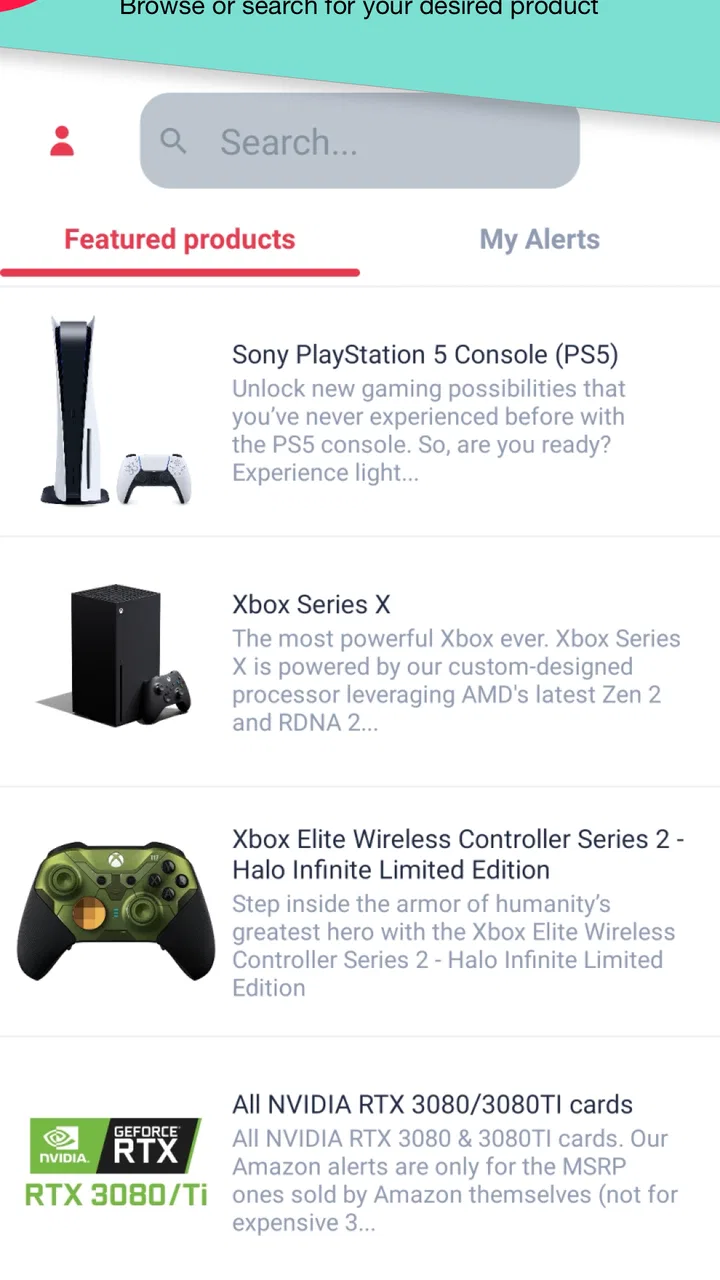
My basic routine is straightforward. I search for the product I am watching, select the relevant listing, and use the availability information to decide whether it is worth monitoring. Instead of repeatedly opening several retailer pages throughout the day, I let the app act as a reminder that the item may have returned. This removes much of the tedious refresh-and-check cycle that usually makes limited-stock shopping frustrating.
You May Also Like

 AccuWeather: Weather Radar
AccuWeather Review: A Quick, Clear Forecast for Everyday Decisions
For everyday plans, the best forecast is the one you can understand quickly. AccuWeather makes rain timing, radar, and local conditions easy to act on, with a few trade-offs.

 Hill Climb Racing
Why Hill Climb Racing Still Turns Crashes Into One More Run
A tiny car, a bumpy hill and one more upgrade: Hill Climb Racing keeps resurfacing because its simple chaos makes every near-miss feel personal.

 AliExpress - Shopping App
AliExpress Makes Global Shopping Feel Personal, but Shoppers Bear the Risk
AliExpress turns a global marketplace into a pocket-sized discovery engine. Its reach is useful, its shopping loop compelling, and its trade-offs easy to miss.

 Lords Mobile: Kingdom Wars
Lords Mobile Is a Kingdom-Building Routine, Not a Quick Match
A case-by-case verdict on the building, battles, device demands, and social commitments that make Lords Mobile rewarding for some players and exhausting for others.

 PDF Scanner app - TapScanner
TapScanner Makes Paperwork Easier to Capture, Check, and Share
TapScanner makes scanning with a phone feel less like a rescue operation and more like a dependable step in getting work done. Its capture tools are useful, though not flawless.

 Block Blast!
 Shows How Much a Puzzle Game Can Leave Out
A quiet grid game shows why puzzle players increasingly value instant clarity, repeatable skill and low-pressure play—and where the genre still needs to catch up.
More From Our News Desk
View All News


A realistic example would be a replacement appliance part or a popular console accessory that has been unavailable for several days. I would add the exact item rather than a broad category, then keep my buying details and budget ready elsewhere. When an alert arrives, I can check the retailer page immediately and decide whether the product, seller, delivery terms, and total cost still make sense. The alert saves time, but it does not replace that final check.
That last point matters. An availability notification is an opportunity, not a guarantee that the purchase will succeed. Popular products can disappear quickly, and a product page may still require me to select a size, color, storage option, or other variation. I do not assume that every alert means the exact version I want is sitting safely in a basket. I treat it as a prompt to act quickly and verify the details myself.
The app is also more practical when I keep my watchlist disciplined. If I add every vaguely interesting product, the alerts become noise and I lose the reason I installed it. I prefer to monitor only items that are difficult to find, unusually time-sensitive, or worth buying at a particular price. This is one of the first habits that separates useful tracking from notification fatigue.
What the first setup tells me about the app
HotStock is not a normal shopping catalog where I expect a complete buying journey from discovery to checkout. Its main job is the waiting stage before a purchase. That makes it a good companion to retailer apps and websites rather than a full replacement for them. I still use the retailer’s own page for product specifications, account details, delivery information, payment, and the final order confirmation.
This division of labor is helpful because it keeps the app focused. I do not need another large marketplace trying to persuade me to browse unrelated products. I need a way to remember what I am waiting for and react when availability changes. For someone who already knows the product name or model, that narrow purpose is a strength.
It is less compelling for ordinary weekly shopping. If I need groceries, common household supplies, or a product that is permanently easy to find, a retailer search, price comparison tool, or shopping list is usually faster. HotStock earns its place when scarcity is the problem.
Settings and notification habits worth checking
The most important setting is not a hidden trick; it is deciding which alerts deserve my attention. I check the app’s notification behavior after adding an item and make sure alerts are allowed at the device level. If the phone has a system setting that silences notifications, limits background activity, or places the app in a restricted battery mode, the usefulness of a stock alert can suffer. I do not assume an alerting app can bypass the phone’s own rules.
I also review the watchlist after a successful purchase. Leaving a product active after ordering can create unnecessary notifications, especially if I am no longer looking for a second unit. Removing completed or abandoned searches keeps the app quieter and makes new alerts easier to notice. This small cleanup habit is more valuable than filling the list with dozens of possibilities.
When a product has several versions, I pay close attention to the exact listing I am following. A generic product name can lead me to the wrong capacity, color, bundle, or regional version. I prefer a precise match, even if that means tracking more than one listing separately. The trade-off is a little more setup in exchange for fewer false starts when an alert arrives.
In-app purchases range from $5.49 to $10.99 per item. That makes it especially important to understand what I am paying for before confirming anything. I would not spend money simply because an item is difficult to find; I would first use the free experience long enough to understand whether the alerts are relevant to my shopping habits. For occasional stock checks, the free option may be enough. For someone monitoring high-priority products regularly, a paid item may be easier to justify, but only if its benefit is clear in the purchase screen.
I also keep expectations realistic about timing. I do not configure an alert and then plan my entire day around it. Notifications can arrive when I am busy, and availability can change before I reach the retailer. The better approach is to decide in advance what I will do: open the alert, verify the item, check the final cost, and either buy or dismiss it. That prevents a rushed decision caused by the excitement of seeing a scarce product return.
Faster patterns for experienced users
My fastest workflow starts before the alert. I keep the retailer app or website familiar, know which product variation I want, and have a realistic spending limit in mind. I do not rely on HotStock to make the decision for me. The app reduces the time spent discovering availability; preparation reduces the time spent hesitating afterward.
Another useful pattern is separating “must buy” items from “nice to have” items. I monitor the first group closely and leave the second group alone unless the product becomes unusually difficult to find. This prevents a tempting notification from interrupting more important work. It also makes the app’s alerts meaningful because each one relates to a deliberate choice.
For products with several acceptable alternatives, I can use a broader strategy: track the preferred model and keep a short list of backup models in mind. If the preferred item appears, I check it first. If it does not, I already know what compromise I am willing to make. The important limitation is that I should not assume HotStock will automatically choose the best alternative for me; the judgment remains mine.
I find it useful to check the product page manually after an alert rather than tapping through blindly. I confirm the seller, variant, delivery estimate, and total price before committing. This is particularly important when scarcity encourages impulse buying. A product being available does not automatically make it a good deal, and a notification does not remove the need to compare the conditions of the purchase.
There is also a practical privacy and convenience trade-off in using any alert-based shopping tool: I am asking another app to help organize products I care about. I keep my watchlist limited to items I am comfortable monitoring, and I avoid treating it as a permanent record of every purchase idea. That simple boundary keeps the app useful without allowing it to become a cluttered archive.
Where HotStock is genuinely stronger than usual alternatives
The usual alternative is manual checking. I can bookmark retailer pages, search the product every morning, or use a browser tab that I refresh repeatedly. Those approaches give me direct control, but they also depend on memory and patience. HotStock’s advantage is that it turns waiting into a defined monitoring task, so I do not have to remember every page I wanted to revisit.
A general price comparison app is different. It may help me compare offers once products are available, but it is not necessarily built around the problem of noticing a return to stock. I see HotStock as complementary: it helps me notice the opportunity, while the comparison tool or retailer page helps me judge whether the opportunity is worth taking.
Retailer-specific stock alerts can sometimes be better when I only buy from one store and want the store’s own product information. HotStock becomes more attractive when I am open to checking availability across the wider shopping landscape and do not want to maintain separate reminders for every product. The right choice depends on whether my problem is one retailer’s notification system or the broader challenge of finding a scarce item at all.
HotStock also has a psychological advantage over constant manual checking. Repeated refreshing can make a purchase feel urgent even when it is not. A watchlist and alert routine creates distance: I choose what to monitor, wait for a signal, and then evaluate it. That structure helps me avoid buying a poor substitute simply because I am tired of searching.
Limits that affect the advanced workflow
The app cannot control the retailer’s inventory, checkout speed, product limits, or ordering process. Even a well-timed notification may lead to an unavailable page, a changed listing, or a product that sells out before payment is completed. I consider this the central limitation of any stock-alert service, and HotStock is best understood within that boundary.
It also cannot decide whether a product is right for me. The app can draw attention to availability, but it does not replace checking compatibility, dimensions, warranty terms, seller reputation, delivery charges, or return conditions. For technical products, I still verify the model number. For clothing or accessories, I check the exact size and color. The more variations a product has, the more carefully I inspect the destination page.
Users who dislike notifications may find the app more irritating than helpful. The same feature that saves a determined shopper from repeated searching can become distracting when the watchlist is too broad. I would skip HotStock if I am not willing to maintain the list and respond selectively to alerts. A simple bookmark may be better for someone who checks only once a week.
The 3.5 average rating, based on about 7,800 ratings and around 4,000 written reviews, reflects a mixed public reaction rather than a universally polished experience. I read that as a reason to test the workflow personally instead of assuming it will fit every phone, product type, or shopping routine. The app has over 500,000 installs, so it is clearly useful to a substantial audience, but popularity alone does not remove the need to check notification behavior on my own device.
Because the app is free to download but includes optional purchases, I would also be careful with expectations around paid functionality. I look at the exact benefit attached to an item before spending anything and compare that cost with the value of the product I am trying to secure. If the item is inexpensive or easy to find through normal searches, paying for extra convenience would not make sense to me.
Who should use it, and who should choose something else
I recommend HotStock to people who have already lost time searching for a product that keeps disappearing. It is a good match for a focused buyer who can name the desired item, tolerate some uncertainty, and act when an alert arrives. It is also useful for shoppers who want a repeatable habit instead of relying on memory or opening multiple retailer pages every few hours.
I would be more cautious recommending it to someone who mainly wants broad product discovery, automatic deal evaluation, or a complete checkout experience. Those needs point toward a marketplace, retailer app, or comparison service. HotStock is not the best tool simply because it is in the shopping category; its value comes from the narrow moment between “I want this” and “it is available again.”
It is also not ideal for a buyer who cannot respond quickly to notifications or who needs guaranteed availability at a specific time. In that situation, reserving an item directly with a retailer or choosing an in-stock alternative may be less stressful. The app can improve awareness, but it cannot promise that an alert will still be actionable when I open it.
After using it as a focused monitor rather than a general store, I find the concept worthwhile. I keep the watchlist small, verify every alert at the retailer, remove items once I am finished, and avoid paying for extras until I understand their value. Those habits make the experience more reliable and prevent the app from creating more noise than convenience.
My final recommendation is simple: HotStock is worth trying if scarcity is the exact shopping problem you need to solve. It is free, available to a broad range of Android users, and more useful than manual refreshing when I am tracking a specific hard-to-find product. Just remember that it is an alert layer, not a guarantee, a price judge, or a replacement for the retailer. Used with clear settings, a disciplined watchlist, and a quick verification routine, it can turn an exhausting search into a manageable waiting game.
FAQs for HotStock - in-stock alerts
01What is HotStock and how does it work?
HotStock is a real-time tracking app that alerts users when popular products are back in stock. By allowing users to select specific items and set up notifications, the app ensures you're immediately informed when a product becomes available online or in nearby stores. It’s an essential tool for catching hard-to-find items before they sell out again.
02Is HotStock free to use, or are there any hidden costs?
HotStock offers both a free version and a premium subscription. The free version includes basic alerts and tracking features, while the premium subscription provides faster alerts, access to more retailers, and additional customization options. There are no hidden costs, but the premium features require a monthly or annual fee.
03How accurate are the alerts provided by HotStock?
HotStock strives for high accuracy by integrating with various retailer databases and using advanced algorithms to monitor stock levels. However, due to the fast-paced nature of online retail, there can sometimes be a slight delay between an item coming back in stock and receiving an alert. Users are encouraged to act quickly upon receiving notifications.
04Can I customize the notifications I receive from HotStock?
Yes, HotStock allows extensive customization of notifications. Users can choose specific products to track, set preferred notification methods (such as push notifications, emails, or SMS), and even adjust the alert frequency. Premium users have access to more advanced customization settings for a tailored experience.
05Does HotStock support international retailers and shipping?
HotStock primarily focuses on major retailers in the US and UK, but it is expanding its reach to include more international retailers. The app provides options to filter alerts based on location preferences, making it easier to find items available for shipping in your region.
Pros
- Real-time stock alerts keep you updated.
- User-friendly interface for easy navigation.
- Supports multiple retailers for wider search.
- Customizable notifications to suit preferences.
- Minimal battery usage despite constant updates.
Cons
- Limited to certain regions and retailers.
- Occasional delay in alert notifications.
- Ads can be intrusive at times.
- Requires account creation to access features.
- No web version available
- app only.

HotStock - in-stock alerts
Gallery